-
Shop
- Adidas
- Advanced Technologies
- Armani
- Bags
- Best-Sellers
- Birkenstock
- Boss
- Calvin Klein
- Car Accessories
- Crocs
- Dating & Social Skills
- Digital Resources
- Budgeting & Saving
- Emotional Intelligence
- Entrepreneurship & Business Growth
- Financial Independence
- Financial Mindset & Psychology
- Goal Setting
- Leadership
- Mindfulness
- Motivation
- Positive Thinking
- Productivity
- Self Confidence
- Sleep Improvement
- Stress Management & Relaxation
- Yoga & Mind-Body Practices
- Dr. Martens
- Drones
- Education & Learning
- Family & Parenting
- Fashion
- Fashion Accessories
- Financial Education
- Furniture
- Gadgets
- Health & Beauty
- Health & Wellness
- Home & Garden
- Home Decor
- Home Supplies
- Kids & Babies
- Lighting
- Massagers
- Mindset
- New Balance
- Nike
- Patio, Lawn & Garden
- Personal Growth
- Pet Care
- Pet Supplies
- Pets
- Shoes
- Sport & Outdoors
- Summer 2025 Fashion Collection
- Sunglasses
- Super Deals
- Timberland
- Tommy Hilfiger
- Travel
- Vans
- Wealth
- Winter Fashion
- Women’s Wellness & Lifestyle
- YouTube Shorts Best-Sellers
Portable LED Projector Setup for Movie Nights
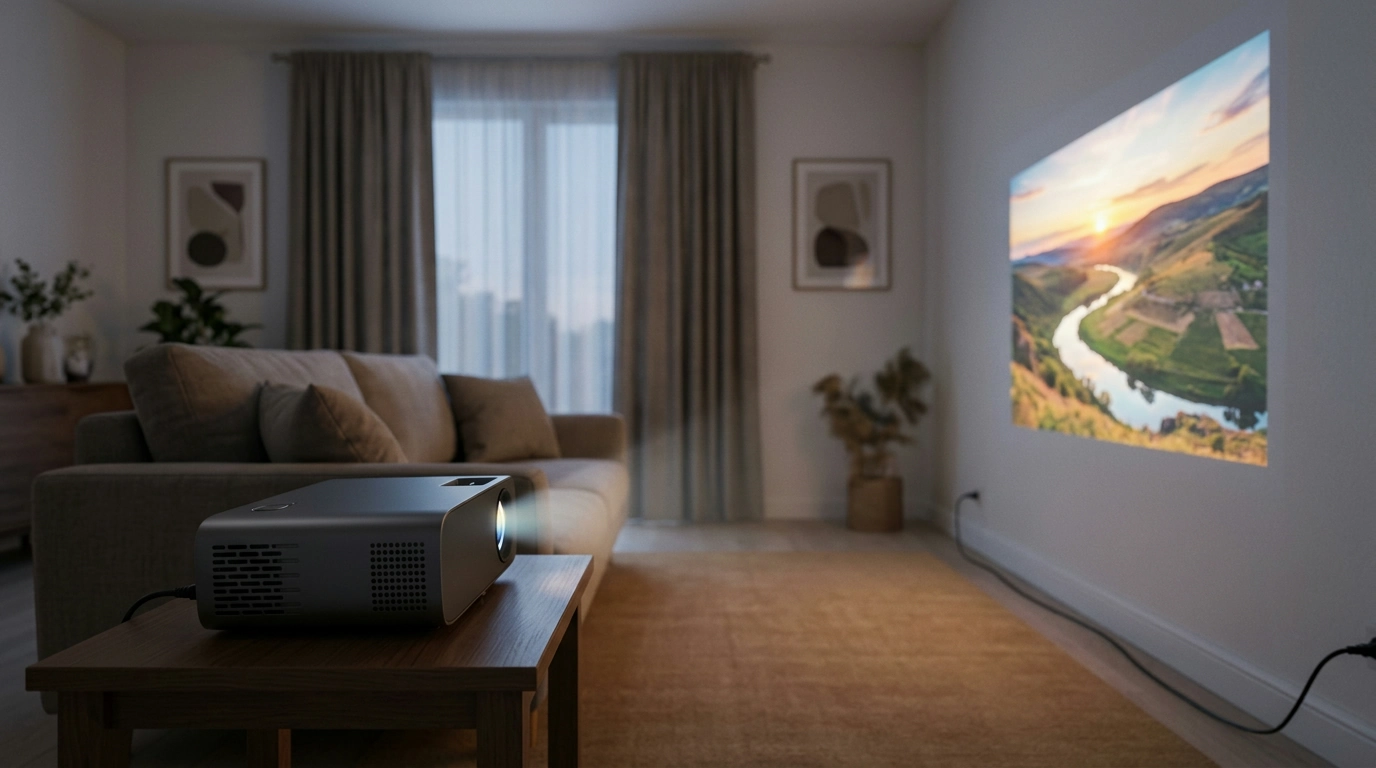
A movie night does not have to stay in one room. Our 4K 1080P Portable LED Projector with WiFi, Bluetooth & Android OS offers a flexible way to bring a larger picture to a suitable space at home. Its portable design makes it easy to move between rooms, while WiFi, Bluetooth, and Android OS give you features to consider when planning how you will access and enjoy your content. For more guidance, see Gadgets Online | This Mini Projector Creates a 200″ Cinema 😳🎬 ….
Whether you are settling in for a favorite movie or sharing a video with family, a little planning can make your setup more comfortable. Start with a suitable viewing surface, then consider your room, connections, and the content you want to watch.
Make Room for a Bigger Picture
A projector can give an ordinary living room or bedroom a different feel for the evening. Instead of gathering around a small screen, you can arrange seating toward a clear wall or projection screen and make the picture the focus of the room. You can also move your setup to another suitable space when your plans change.
Look for a wall with enough uninterrupted space for the image. A projection screen is another option if you prefer a dedicated viewing surface. Reducing ambient light can help you see the picture more comfortably, so consider closing curtains or turning off nearby lamps when it is time to watch.
The projector’s title includes both “4K” and “1080P,” but those terms do not necessarily mean the same thing. Before you buy, review the product details for its native resolution and supported input. A projector that accepts a 4K signal does not automatically display a native 4K image.
Features That Keep Entertainment Flexible
WiFi and Android OS are useful features to consider when you want a connected setup. Your experience will depend on your network, available apps, and the requirements of the content you want to access. Check those details before relying on a particular streaming service. You can also visit the official Android website for general information about the operating system.
Bluetooth may be useful when connecting a compatible device, such as a speaker. Connection capabilities can vary, so confirm that the projector and your intended device work together before making them part of your setup. The Bluetooth Technology Overview provides a general introduction to how the technology works.
Portability adds another layer of flexibility. You might watch in the living room one night and set up in a bedroom the next. In either location, choose a stable surface and make sure you have access to power and enough space around the projector for ventilation.
| Feature | What to Consider |
|---|---|
| Portable design | Choose a stable spot with room for the projector. |
| WiFi and Android OS | Check app and network requirements before planning a streaming setup. |
| Bluetooth | Confirm compatibility with the device you want to connect. |
| 4K 1080P listing | Check the product details for native resolution and supported input. |
Set Up Your Viewing Space
Start by placing the projector on a stable surface facing your wall or screen. Keep it near an accessible power source, and leave adequate ventilation space according to the included instructions. Arrange cords where they will not create a tripping hazard or pull the projector out of position.
Next, dim the room and adjust the projector’s position until the picture is comfortable to view. The distance from the viewing surface affects the size of the image, so allow yourself room to experiment. Position your seating where everyone can see without having to strain or block the projected picture.
When you are ready to connect, follow the included instructions for joining your WiFi network and pairing any compatible Bluetooth device. It is worth trying your chosen content before guests arrive so you have time to resolve connection or access issues.
Choose a Setup That Fits Your Plans
Think about where you expect to watch most often. A room with a clear wall, controllable light, and a convenient power source may be a better fit than a space that requires frequent rearranging. If you plan to move the projector, consider where you can place it securely in each room.
Also consider how you intend to access content and hear it. Review app availability, connection options, and compatibility with the devices you already own. Our team recommends checking the projector’s product page for current details and availability before making your choice.
If your kitten joins you for movie night, our Cozy Cartoon Cat Cave Bed for Kittens is another option to explore for your shared space.
FAQ
Does this projector have native 4K resolution?
The title includes both 4K and 1080P, so check the product details for native resolution and supported input. Support for a 4K signal does not by itself mean the projector has native 4K resolution.
Can I connect a Bluetooth speaker to the projector?
The projector is listed with Bluetooth, but you should confirm that your speaker is compatible and follow the included pairing instructions.
Do I need a projection screen?
No, a clear wall can be an option, though you can also use a projection screen. A darker room can help make the picture more enjoyable to watch.
Recommended for you
Was this article helpful?
Yes
No







Leave a comment