-
Shop
- Adidas
- Advanced Technologies
- Armani
- Bags
- Best-Sellers
- Birkenstock
- Boss
- Calvin Klein
- Car Accessories
- Crocs
- Dating & Social Skills
- Digital Resources
- Budgeting & Saving
- Emotional Intelligence
- Entrepreneurship & Business Growth
- Financial Independence
- Financial Mindset & Psychology
- Goal Setting
- Leadership
- Mindfulness
- Motivation
- Positive Thinking
- Productivity
- Self Confidence
- Sleep Improvement
- Stress Management & Relaxation
- Yoga & Mind-Body Practices
- Dr. Martens
- Drones
- Education & Learning
- Family & Parenting
- Fashion
- Fashion Accessories
- Financial Education
- Furniture
- Gadgets
- Health & Beauty
- Health & Wellness
- Home & Garden
- Home Decor
- Home Supplies
- Kids & Babies
- Lighting
- Massagers
- Mindset
- New Balance
- Nike
- Patio, Lawn & Garden
- Personal Growth
- Pet Care
- Pet Supplies
- Pets
- Shoes
- Sport & Outdoors
- Summer 2025 Fashion Collection
- Sunglasses
- Super Deals
- Timberland
- Tommy Hilfiger
- Travel
- Vans
- Wealth
- Winter Fashion
- Women’s Wellness & Lifestyle
- YouTube Shorts Best-Sellers
Bluetooth 5.3 Wireless Earbuds: HD Calls & HiFi Sound
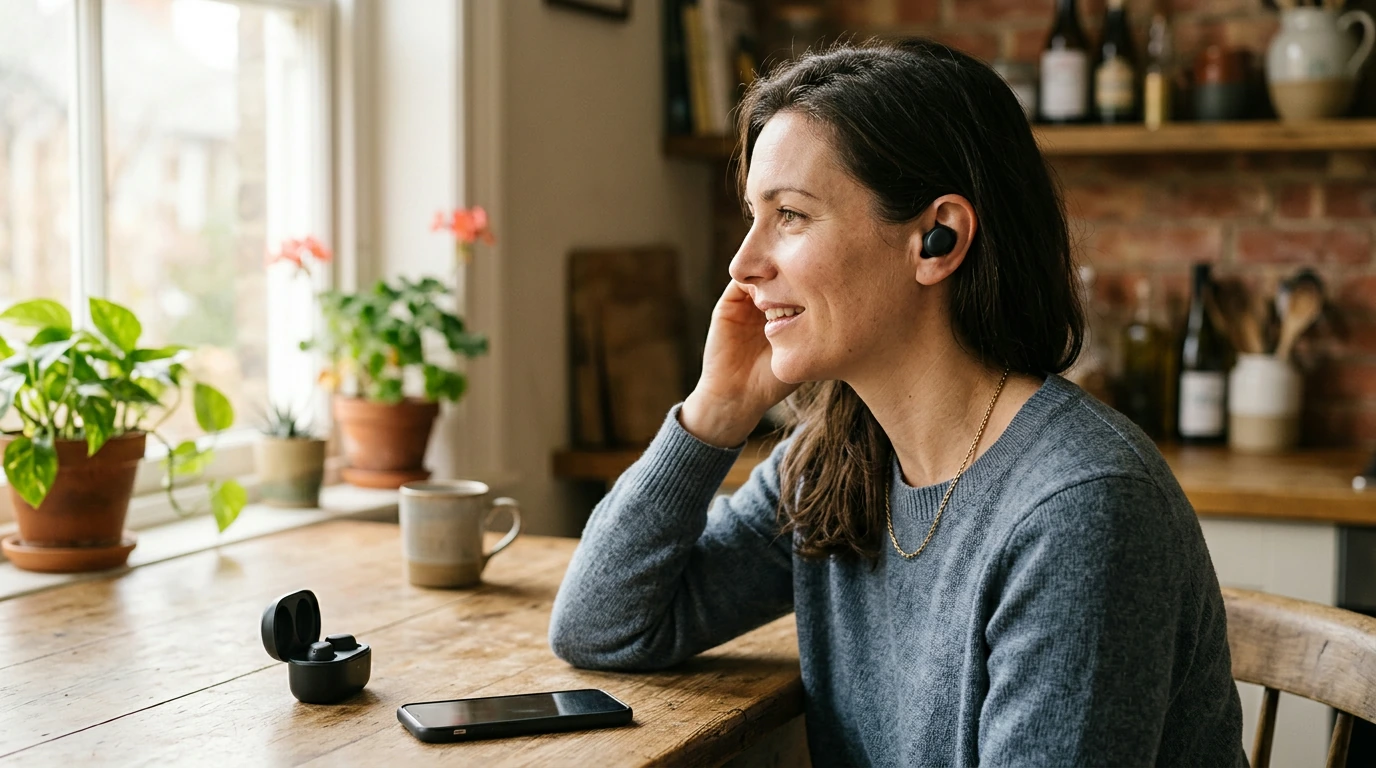
Wireless Bluetooth V5.3 Earbuds with HD Call & HIFI Sound
Great audio should be easy: quick pairing, a stable connection, clear calls, and sound that makes playlists and podcasts feel full—not thin. Our Wireless Bluetooth V5.3 Earbuds with HD Call & HIFI Sound focus on the essentials you use every day: reliable Bluetooth performance, HD call clarity for conversations on the go, and HIFI sound for richer detail across music, videos, and streaming.
What makes these earbuds a solid everyday pick
- Bluetooth V5.3 support is built for smooth, modern wireless performance—helping keep audio steady as you move between rooms, commute, or switch apps.
- HD call focus helps voices come through more clearly during calls, video chats, and voice notes—useful for work-from-anywhere routines.
- HIFI sound tuning is meant to add detail and presence, so music feels more layered and spoken audio stays crisp.
- True wireless convenience keeps pockets and bags free of tangled cords—ideal for quick errands, workouts, and travel days.
Feature snapshot: what you’re getting and why it matters
When you’re choosing earbuds, specs only matter if they improve day-to-day use. Here’s a quick way to translate the headline features into real-world benefits.
Quick guide to the core features
| Feature | What it means day-to-day | Why it matters |
|---|---|---|
| Bluetooth V5.3 | Modern Bluetooth connection standard for pairing and playback | Helps keep audio stable and responsive during typical daily use |
| HD Call | Call-focused audio capture and processing for clearer voice transmission | Better call clarity for commuting, office calls, and quick check-ins |
| HIFI Sound | Tuning aimed at richer detail and more natural balance | More enjoyable music, clearer dialogue, and less “flat” audio |
| True Wireless Design | No cable between earbuds and device | Freedom of movement for workouts, chores, and travel |
Where HD calls make the biggest difference
- Commuting and walking: conversations stay more understandable when your phone is in a pocket or bag.
- Hybrid work: a quick call from a kitchen, car, or shared space feels less like shouting and more like normal talking.
- Voice messages and dictation: clearer pickup helps reduce misheard words and repeated takes.
- Family and travel coordination: short calls are easier when time is limited and surroundings are busy.
Getting the best HIFI sound for music and streaming
- Start with the right fit: a secure seal improves bass response and overall clarity. If the fit is loose, sound can feel thin.
- Match volume to content: spoken audio can be comfortable at lower volume, while music with wide dynamics may sound best a notch higher (without pushing into harshness).
- Use your phone’s EQ sparingly: small adjustments can enhance vocals or bass, but extreme settings can reduce clarity.
- Choose high-quality streams when possible: better source audio helps the earbuds deliver more detail.
Bluetooth V5.3 pairing and connection tips
- Pair close-range first: keep the earbuds and phone close during first-time pairing so the initial connection is clean and fast.
- Refresh when needed: if audio ever stutters, try turning Bluetooth off/on on the phone, or “forget” the device and re-pair to refresh the connection.
- Manage crowded environments: in busy wireless areas (gyms, airports), staying within a reasonable distance can help maintain steady playback.
- Switching devices: disconnect from the first device before pairing to the second to reduce conflicts.
If you’d like official step-by-step guidance by platform, you can reference Apple’s Bluetooth connection steps and Google’s Android Bluetooth help. For Bluetooth standards background, the Bluetooth SIG specifications overview is a reliable source.
Simple daily habits that keep earbuds sounding great
- Quick wipe-downs help: wipe earbuds regularly with a soft, dry cloth to remove oils and dust that can affect comfort and sound openings.
- Store between uses: keep them stored safely to protect from pocket lint and accidental drops.
- Avoid heavy moisture: don’t expose earbuds to significant sweat or water unless you know your exact model is rated for it.
- Fix channel imbalance: if sound becomes unbalanced between left and right, check for debris around the sound outlet and clean gently.
Who these earbuds suit best
A quick setup checklist (first day with your earbuds)
Shop our in-stock picks
- Wireless Bluetooth V5.3 Earbuds with HD Call & HIFI Sound — our grab-and-go option for clearer calls and fuller everyday listening.
- Calvin Klein Retro Square Sunglasses with Dark Lenses — an easy add-on for commutes, outdoor calls, and travel days.
- IPL Eye Beauty Device with Three-Color Light & Vibration — a compact self-care pick for your routine at home.
FAQ
How do Bluetooth 5.3 earbuds connect to a phone?
Open your phone’s Bluetooth settings, put the earbuds into pairing mode, and select them from the list of available devices. For first-time pairing, keep them close to your phone to ensure a clean connection. If pairing fails, toggle Bluetooth off and on, or forget the device and try again.
Why do earbuds sometimes sound quiet or lack bass?
The most common cause is an imperfect fit—without a good seal, bass drops and overall volume can seem lower. Also check your phone’s volume, any volume limits, and whether extreme EQ settings are reducing clarity. If one side is quieter, gentle cleaning around the sound outlet can help remove blockage.
What helps make calls clearer on wireless earbuds?
Speak at a steady volume and try to reduce wind or handling noise by keeping movement minimal during calls. Staying in areas with stronger signal and less background noise can make your voice easier to understand. Also confirm your earbuds are selected as the active audio device for the call.
Recommended for you
Was this article helpful?
Yes
No









Leave a comment