-
Shop
- Adidas
- Advanced Technologies
- Armani
- Bags
- Best-Sellers
- Birkenstock
- Boss
- Calvin Klein
- Car Accessories
- Crocs
- Dating & Social Skills
- Digital Resources
- Budgeting & Saving
- Emotional Intelligence
- Entrepreneurship & Business Growth
- Financial Independence
- Financial Mindset & Psychology
- Goal Setting
- Leadership
- Mindfulness
- Motivation
- Positive Thinking
- Productivity
- Self Confidence
- Sleep Improvement
- Stress Management & Relaxation
- Yoga & Mind-Body Practices
- Dr. Martens
- Drones
- Education & Learning
- Family & Parenting
- Fashion
- Fashion Accessories
- Financial Education
- Furniture
- Gadgets
- Health & Beauty
- Health & Wellness
- Home & Garden
- Home Decor
- Home Supplies
- Kids & Babies
- Lighting
- Massagers
- Mindset
- New Balance
- Nike
- Patio, Lawn & Garden
- Personal Growth
- Pet Care
- Pet Supplies
- Pets
- Shoes
- Sport & Outdoors
- Summer 2025 Fashion Collection
- Sunglasses
- Super Deals
- Timberland
- Tommy Hilfiger
- Travel
- Vans
- Wealth
- Winter Fashion
- Women’s Wellness & Lifestyle
- YouTube Shorts Best-Sellers
Black Aluminum Wireless Mechanical Keyboard: Hot-Swap RGB
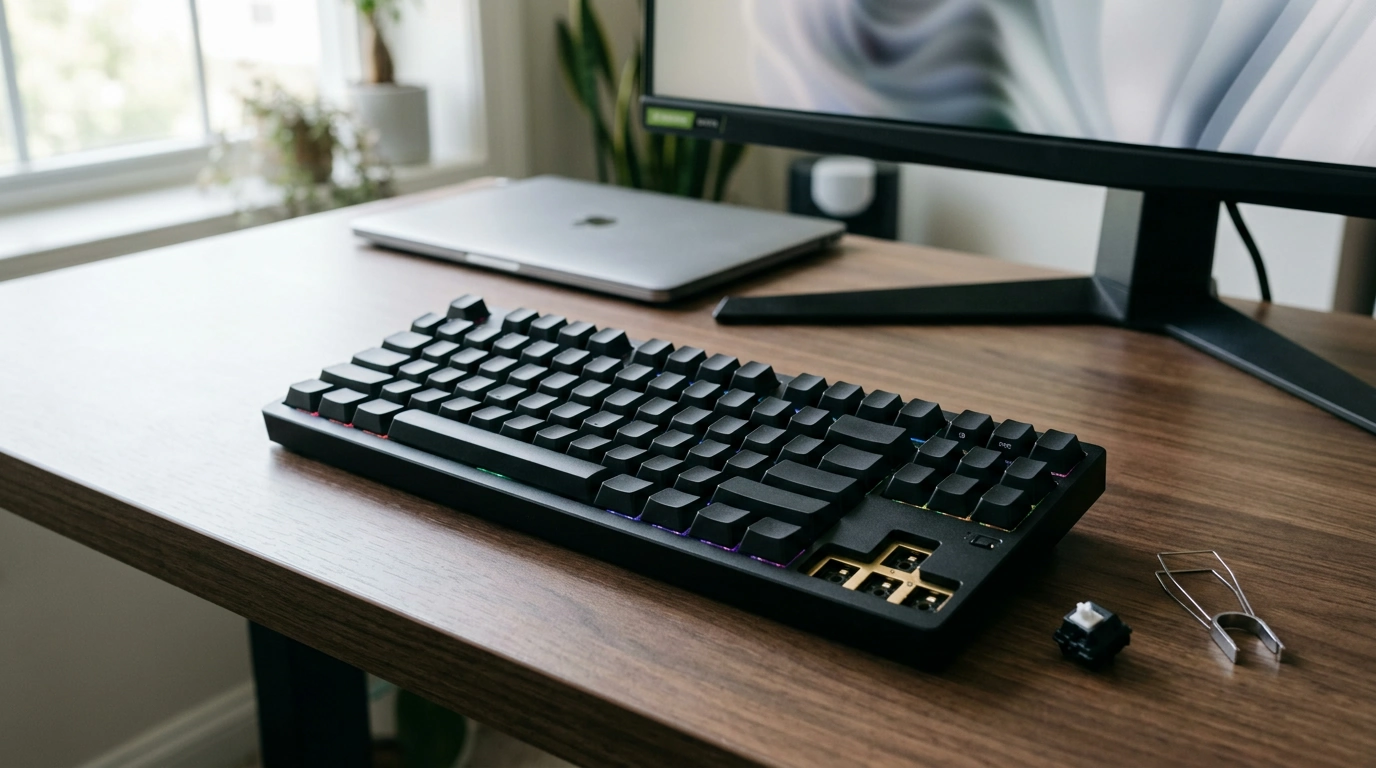
Black Aluminum Wireless Mechanical Gaming Keyboard – Hot-Swap RGB
A keyboard should feel solid, respond instantly, and fit the way you play and work. Our black aluminum wireless mechanical gaming keyboard pairs a rigid metal build with wireless freedom, hot-swap switch flexibility, and RGB lighting you can tune to your setup—without locking you into one “forever” feel.
Why an aluminum keyboard changes the daily feel
An aluminum chassis does more than look premium—it changes how the board behaves under your hands. With a metal body, the keyboard tends to stay planted during fast inputs, which helps when you’re making quick corrections in-game or flying through a work sprint.
- A metal chassis adds stability so the board stays planted during intense sessions.
- Aluminum reduces unwanted flex, helping keys feel more consistent from edge to edge.
- A clean black finish keeps the look minimal while letting RGB stand out when you want it to.
Wireless that fits gaming nights and workdays
Wireless connectivity is about removing friction: fewer cables to snag, easier desk resets, and quicker transitions between a laptop dock, a desktop rig, and even a living-room setup. When you’re using a mechanical keyboard across multiple spaces, not having to re-route cables every time is the difference between “I’ll do it later” and actually keeping your workspace clean.
- Wireless keeps the desk clear and makes it easy to switch between spaces.
- Ideal for laptop docks, console setups, and multi-device desks where one cable never stays put.
- For best results, keep the receiver/connection path unobstructed and charge on a routine that matches your usage.
Standards matter for consistent behavior across devices. If you like to go deep on how keyboard inputs are defined and interpreted, the official USB HID Usage Tables are the reference point. For wireless protocol details and interoperability, the Bluetooth Core Specification is the authoritative source.
Hot-swap sockets: change the feel without changing the keyboard
Hot-swap support is the feature that turns a keyboard into a long-term platform. Instead of being stuck with one switch type, you can replace compatible switches without soldering—swap a few keys to test a new feel, or rebuild the whole board once you know what you like.
- Hot-swap support lets you replace compatible mechanical switches without soldering.
- Mix switch types by zone: faster on movement keys, quieter on keys you hammer all day.
- If a switch starts to misbehave, you can replace that one switch instead of retiring the keyboard.
| Need | What to change | Result |
|---|---|---|
| Faster response on common keys | Swap switches on WASD / main cluster | More consistent feel where it matters most |
| Quieter setup | Use quieter switch options where noise is an issue | Reduced sound without sacrificing mechanical feel |
| Long-term upkeep | Replace a single switch if it fails | Extends keyboard lifespan |
RGB that’s practical, not just flashy
RGB is at its best when it helps you, not when it distracts you. A well-chosen color can improve visibility in low light and keep your eyes oriented during long sessions. If you want a calm, work-first vibe, a single static color can look sharp on black aluminum. If you want the full gaming setup energy, you can lean into effects—just keep readability and comfort as the priority.
- RGB lighting improves visibility in low light and can match the rest of your build.
- Set a single color for focus or use effects for a more energetic setup—either way, aim for fast readability.
- If battery life matters, dim static lighting typically uses less power than bright animated patterns.
Comfort and control: getting the layout to work for you
Mechanical keyboards reward small ergonomic tweaks. Your goal is a neutral wrist position and relaxed shoulders—especially if you’re switching between gaming and typing throughout the day. The best “layout” is the one that keeps your hands comfortable and your inputs consistent.
- Keep wrists neutral and position the board so your shoulders stay relaxed.
- Keycap feel matters as much as switches; texture and profile can change comfort and speed.
- If you’re coming from a membrane keyboard, give yourself a short adjustment window for muscle memory.
Setup checklist: a smooth first week
The first few days are when you’ll learn what you actually prefer—brightness, switch feel on your most-used keys, and how you want the keyboard to behave across devices. A simple routine makes the experience frictionless.
Quick spec snapshot for easier comparison
| Feature | What it means for you |
|---|---|
| Aluminum body | More stability and a firmer, more premium feel under fast input |
| Wireless connectivity | Cleaner desk and easier moves between setups |
| Hot-swap switches | Change switch feel without soldering; easier maintenance |
| RGB lighting | Custom visibility and style to match your setup |
In-stock picks from our team
- Black Aluminum Wireless Mechanical Gaming Keyboard – Hot-Swap RGB
- IPL Eye Beauty Device with Three-Color Light & Vibration
- Calvin Klein Retro Square Sunglasses with Dark Lenses
FAQ
What does hot-swap mean on a mechanical keyboard?
Hot-swap means you can remove and replace compatible mechanical switches without soldering. Use only switch types that match the socket, and handle switches carefully so the pins don’t bend during installation.
Is a wireless mechanical keyboard good for gaming?
Yes—wireless can be excellent for gaming when the connection is stable and your setup minimizes interference. Keep the receiver/connection path clear and make charging part of your routine before long sessions.
How can RGB lighting affect battery life?
Brighter lighting and animated effects usually drain the battery faster than dim, static modes. If runtime matters most, lower the brightness and choose a steady color instead of continuous animations.
Recommended for you
Was this article helpful?
Yes
No









Leave a comment