-
Shop
- Adidas
- Advanced Technologies
- Armani
- Bags
- Best-Sellers
- Birkenstock
- Boss
- Calvin Klein
- Car Accessories
- Crocs
- Dating & Social Skills
- Digital Resources
- Budgeting & Saving
- Emotional Intelligence
- Entrepreneurship & Business Growth
- Financial Independence
- Financial Mindset & Psychology
- Goal Setting
- Leadership
- Mindfulness
- Motivation
- Positive Thinking
- Productivity
- Self Confidence
- Sleep Improvement
- Stress Management & Relaxation
- Yoga & Mind-Body Practices
- Dr. Martens
- Drones
- Education & Learning
- Family & Parenting
- Fashion
- Fashion Accessories
- Financial Education
- Furniture
- Gadgets
- Health & Beauty
- Health & Wellness
- Home & Garden
- Home Decor
- Home Supplies
- Kids & Babies
- Lighting
- Massagers
- Mindset
- New Balance
- Nike
- Patio, Lawn & Garden
- Personal Growth
- Pet Care
- Pet Supplies
- Pets
- Shoes
- Sport & Outdoors
- Summer 2025 Fashion Collection
- Sunglasses
- Super Deals
- Timberland
- Tommy Hilfiger
- Travel
- Vans
- Wealth
- Winter Fashion
- Women’s Wellness & Lifestyle
- YouTube Shorts Best-Sellers
Hall Joystick Bluetooth Gamepad for Switch, PC & Mobile
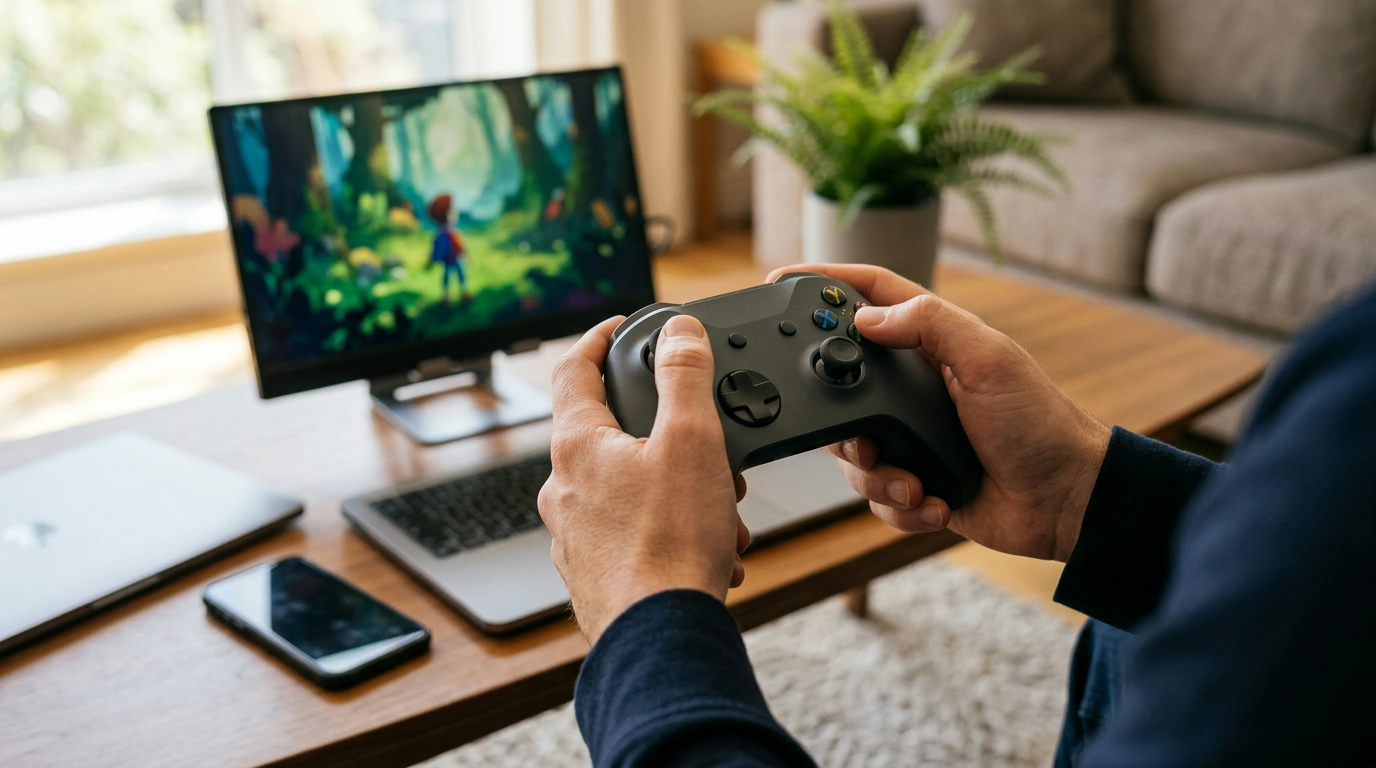
Wireless Bluetooth Gamepad with Hall Joystick for Switch, PC, iOS, and Android
A great controller disappears in your hands—inputs feel immediate, aiming stays steady, and long sessions never turn into hand fatigue. Our team put together this wireless Bluetooth gamepad for exactly that kind of play across Nintendo Switch, PC, iOS, and Android, with a Hall-effect joystick design aimed at smooth, consistent control. It’s a smart pick when you rotate between console and mobile gaming, want a cleaner setup without cables, and prefer a more reliable feel for movement-heavy games like platformers, racers, and shooters. For more guidance, see AOC PC Controller with Interactive Screen, Hall Effect ….
Featured picks from our store
- Wireless Bluetooth Gamepad for Nintendo Switch, PC, iOS, and Android with Hall Joystick
- Calvin Klein Retro Square Sunglasses with Dark Lenses (a practical add-on for outdoor Switch play or travel days when glare makes screens harder to read)
Who this controller is made for
- Nintendo Switch players who want a comfortable alternative for tabletop play on a stand, or TV play without being tethered.
- PC players who prefer a dedicated gamepad over keyboard/mouse for driving, sports, fighting, and couch co-op.
- Mobile gamers on iOS and Android who want real buttons and analog control for supported games and cloud gaming.
- Anyone tired of inconsistent stick feel over time and looking for a Hall joystick option.
- Players who rotate between devices and want one controller to cover multiple screens.
Hall joystick control: what it changes in everyday gameplay
Hall-effect joysticks are often chosen for how they feel during small, repeated inputs—exactly the kind of movements that expose “wobble” or uneven response. What that means for you is less time compensating for the controller and more time staying focused on the game’s timing and positioning. For further reading, see ManbaOne Interactive Screen Wireless Gaming Controller ….
- More consistent stick response for fine adjustments in camera control, aiming, and steering.
- Smoother micro-movements for platforming sections where small inputs matter.
- A more even feel across the full range of motion, helpful when games rely on gradual acceleration/turning.
- Better suited to long-term use when you want stable input behavior rather than building “recalibration habits.”
- A strong match if you play with higher sensitivity and notice small stick fluctuations more quickly.
Wireless play across Switch, PC, iOS, and Android
Bluetooth keeps your setup simple: fewer cables at a desk, more flexibility in a living room, and a cleaner travel kit. The big win is continuity—one controller that can follow you from Switch to PC to phone/tablet as long as the platform and game support external controllers.
Quick pairing guide by platform
| Platform | Connection approach | Practical tip |
|---|---|---|
| Nintendo Switch | Pair as a wireless controller from the console’s controller settings | Keep the controller close to the console during first pairing to reduce retries |
| Windows PC | Add a Bluetooth device and select the controller when it appears | If a game doesn’t detect inputs right away, restart the game after pairing |
| iOS / iPadOS | Pair in Bluetooth settings, then launch a controller-supported game | Confirm the game supports controllers; not every title maps controls the same way |
| Android | Pair in Bluetooth settings; verify controller support in-game settings | If inputs feel off, check the game’s controller layout or remap if available |
If you want the official platform steps, these references are helpful: Nintendo Support, Apple Support, and Microsoft Support.
Comfort and control layout that supports longer sessions
Comfort isn’t just about grip shape—it’s also about how quickly your hands can find the right control without thought. A full set of physical controls helps you build muscle memory, which matters for both quick reactions and relaxed play.
- Ergonomic grip shape helps reduce hand strain during extended play.
- Physical buttons and analog control suit games that demand timing, aim corrections, and repeatable inputs.
- Wireless play makes posture easier: lean back, reposition, and place your screen where it’s comfortable.
- Consistent trigger and button actuation supports combo timing in fighting games and fast decisions in action titles.
- For casual sessions, quick wake-and-play convenience can matter as much as raw performance.
Best-use scenarios (and how to get the most out of it)
- Switch on a table stand: You get a comfortable viewing distance and steadier aiming without Joy-Con hand cramping.
- PC living-room setup: Pair once and keep it as the go-to couch controller for co-op, platformers, and emulation-style libraries.
- Mobile + clip/stand setups: Controller-supported games can feel closer to a compact handheld-console experience.
- Racing and sports: Analog steering and gradual movement typically feel more natural than touch controls.
- Cloud gaming: A dedicated controller can make sessions feel more controlled by improving input consistency—especially in precision games.
What to check before pairing to a new device
FAQ
Does this controller work with iPhone and iPad games?
Yes—your iPhone or iPad can pair with it over Bluetooth, and it works with controller-supported iOS/iPadOS games and services. Compatibility depends on whether the specific game supports external controllers and how that game maps the controls.
How do I switch the controller between Switch and PC without headaches?
If it keeps auto-reconnecting to the old device, unpair it there first, then pair it fresh on the new device. When switching gets stubborn, remove it from the Bluetooth list on both devices, toggle Bluetooth off/on, and then re-pair.
What’s the advantage of a Hall joystick in real gameplay?
You’ll typically notice smoother small movements and more consistent stick response, which helps with aiming, camera control, steering, and precision platforming. It’s especially useful if you play with higher sensitivity and rely on tiny corrections.
Recommended for you
Was this article helpful?
Yes
No









Leave a comment