-
Shop
- Adidas
- Advanced Technologies
- Armani
- Bags
- Best-Sellers
- Birkenstock
- Boss
- Calvin Klein
- Car Accessories
- Crocs
- Dating & Social Skills
- Digital Resources
- Budgeting & Saving
- Emotional Intelligence
- Entrepreneurship & Business Growth
- Financial Independence
- Financial Mindset & Psychology
- Goal Setting
- Leadership
- Mindfulness
- Motivation
- Positive Thinking
- Productivity
- Self Confidence
- Sleep Improvement
- Stress Management & Relaxation
- Yoga & Mind-Body Practices
- Dr. Martens
- Drones
- Education & Learning
- Family & Parenting
- Fashion
- Fashion Accessories
- Financial Education
- Furniture
- Gadgets
- Health & Beauty
- Health & Wellness
- Home & Garden
- Home Decor
- Home Supplies
- Kids & Babies
- Lighting
- Massagers
- Mindset
- New Balance
- Nike
- Patio, Lawn & Garden
- Personal Growth
- Pet Care
- Pet Supplies
- Pets
- Shoes
- Sport & Outdoors
- Summer 2025 Fashion Collection
- Sunglasses
- Super Deals
- Timberland
- Tommy Hilfiger
- Travel
- Vans
- Wealth
- Winter Fashion
- Women’s Wellness & Lifestyle
- YouTube Shorts Best-Sellers
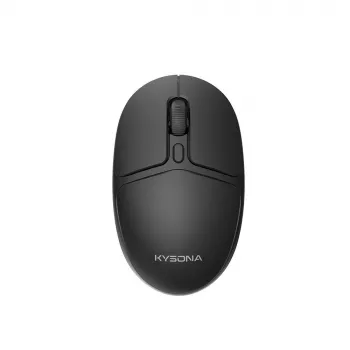
Wireless Silent Mouse: 8000 DPI Bluetooth Comfort

Quiet Control for Work and Play: Wireless Silent Mouse with 8000DPI, Bluetooth, Ergonomic Design & Long Battery Life
A mouse should disappear into the background—no loud clicks, no hand fatigue, no constant charging—while still keeping every movement accurate. Our wireless silent mouse is built for focused workspaces and fast-paced tasks alike, combining high-DPI precision, Bluetooth convenience, an ergonomic shape, and battery life designed for everyday use. If you work around other people, switch between devices, or simply want smoother control with less noise, this is the kind of upgrade you notice immediately—mostly because you stop noticing your mouse at all.
Who This Mouse Fits Best
- Shared spaces: silent clicking helps keep meetings, libraries, dorms, and offices calmer.
- Hybrid work setups: Bluetooth connectivity keeps desks cleaner and travel bags lighter.
- Precision tasks: adjustable DPI supports anything from spreadsheets to design work.
- Long sessions: ergonomic contours aim to reduce strain during day-long use.
- Multi-device routines: easy switching between devices keeps workflows moving.
Silent Clicking Without Losing Feedback
Quiet clicks matter most when you’re trying to stay in a flow state—or when someone else is. Silent switches are designed to reduce click noise so your focus stays on the task, not the mouse. That’s especially helpful for late-night work, study sessions, shared desks, and calls where mic pickup can turn normal clicking into a distraction.
If you pair a mechanical keyboard with a loud mouse, the mouse can become the “sharp” sound that breaks the room’s overall comfort. A quieter mouse balances the sound profile, so the keyboard becomes the dominant (and more predictable) noise. To dial the feel in without changing your habits, you can also tune pointer speed and acceleration in your operating system so the cursor motion matches what your hand expects.
8000DPI Precision: What It Changes Day to Day
DPI is about how far your cursor moves in response to your hand movement. Higher DPI can help the cursor travel farther with less wrist motion—useful on large monitors and multi-screen setups. Lower DPI is often better for controlled selections, careful edits, and tasks where “landing” precisely matters more than speed.
For a practical setup, start in the middle, then adjust based on screen size, resolution, and your comfort. Many people keep one DPI for work and another for casual use (or gaming-style navigation) so muscle memory stays consistent.
Quick DPI Guide by Task
| Task | Suggested DPI Range | Why It Helps |
|---|---|---|
| Email, documents, spreadsheets | 800–1600 | Stable cursor control for precise clicking and highlighting |
| General browsing on large displays | 1600–3200 | Faster navigation without over-shooting targets |
| Multi-monitor workflows | 2400–4800 | Reduces repeated wrist travel across screens |
| Detail edits and careful selections | 800–1200 | Supports fine control and reduces jitter |
| Fast navigation and rapid switching | 3200–8000 | Quick pointer movement with minimal hand motion |
Bluetooth Convenience for Modern Setups
Bluetooth connectivity keeps ports free for drives, headsets, and other accessories—especially valuable on slim laptops and compact desktops. It also cuts down on small items to manage in your bag, since you’re not relying on a dongle that can get misplaced between home, office, and travel.
For the most stable experience, keep the mouse and your device within typical Bluetooth operating range and reduce local interference when you can (crowded USB hubs and dense cable clusters can add noise). If you want a deeper look at how Bluetooth standards and compatibility work across devices, the Bluetooth SIG is a solid reference: https://www.bluetooth.com/.
Ergonomic Design That Supports Longer Sessions
Comfort isn’t a luxury when you use a mouse for hours. An ergonomic shape is intended to support a more natural hand position so long sessions feel easier. The best results usually come from matching your grip style—palm, claw, or fingertip—so your hand rests without needing constant tension to steer the pointer.
Our team also recommends pairing a supportive mouse with a neutral wrist and relaxed shoulders. Keep the mouse close to your keyboard to avoid reaching, which can quietly add shoulder strain over time. For workstation ergonomics guidance beyond just mouse choice, you can reference NIOSH and OSHA resources: https://www.cdc.gov/niosh/topics/ergonomics/ and https://www.osha.gov/etools/computer-workstations.
Long Battery Life for Everyday Reliability
Battery life is a daily quality-of-life feature: fewer interruptions, fewer mid-task surprises, and less cable clutter. It’s especially helpful if you commute, hot-desk, or move between rooms where a charger isn’t always available.
Simple Setup and Better Feel in Minutes
In-Stock Picks From Our Store
- Wireless Silent Mouse with 8000DPI, Bluetooth, Ergonomic Design & Long Battery Life
- IPL Eye Beauty Device with Three-Color Light & Vibration
- Calvin Klein Retro Square Sunglasses with Dark Lenses
FAQ
Does a silent mouse feel mushy compared to a standard click?
Silent switches are made to reduce noise while still keeping a tactile response, so you typically still feel the actuation even though you don’t hear the sharp click. If you’re coming from louder mechanical switches, give yourself a short adjustment period while your finger pressure naturally recalibrates.
What DPI should be used for office work versus fast navigation?
For office work, 800–1600 DPI tends to feel controlled and accurate for highlighting and precise clicks. For faster navigation, 1600–3200 is a common everyday range, while higher settings can be useful on large or multi-monitor setups if you prefer minimal hand movement.
Will Bluetooth affect latency for everyday tasks?
For typical productivity tasks, Bluetooth is generally responsive and feels immediate in normal use. Keeping devices within range, minimizing local interference, and ensuring your device’s Bluetooth is enabled and up to date can help maintain consistent performance.
Recommended for you
Was this article helpful?
Yes
No









Leave a comment