-
Shop
- Adidas
- Advanced Technologies
- Armani
- Bags
- Best-Sellers
- Birkenstock
- Boss
- Calvin Klein
- Car Accessories
- Crocs
- Dating & Social Skills
- Digital Resources
- Budgeting & Saving
- Emotional Intelligence
- Entrepreneurship & Business Growth
- Financial Independence
- Financial Mindset & Psychology
- Goal Setting
- Leadership
- Mindfulness
- Motivation
- Positive Thinking
- Productivity
- Self Confidence
- Sleep Improvement
- Stress Management & Relaxation
- Yoga & Mind-Body Practices
- Dr. Martens
- Drones
- Education & Learning
- Family & Parenting
- Fashion
- Fashion Accessories
- Financial Education
- Furniture
- Gadgets
- Health & Beauty
- Health & Wellness
- Home & Garden
- Home Decor
- Home Supplies
- Kids & Babies
- Lighting
- Massagers
- Mindset
- New Balance
- Nike
- Patio, Lawn & Garden
- Personal Growth
- Pet Care
- Pet Supplies
- Pets
- Shoes
- Sport & Outdoors
- Summer 2025 Fashion Collection
- Sunglasses
- Super Deals
- Timberland
- Tommy Hilfiger
- Travel
- Vans
- Wealth
- Winter Fashion
- Women’s Wellness & Lifestyle
- YouTube Shorts Best-Sellers
Bluetooth 5.4 RGB Earbuds: Easy Pairing, Daily Comfort
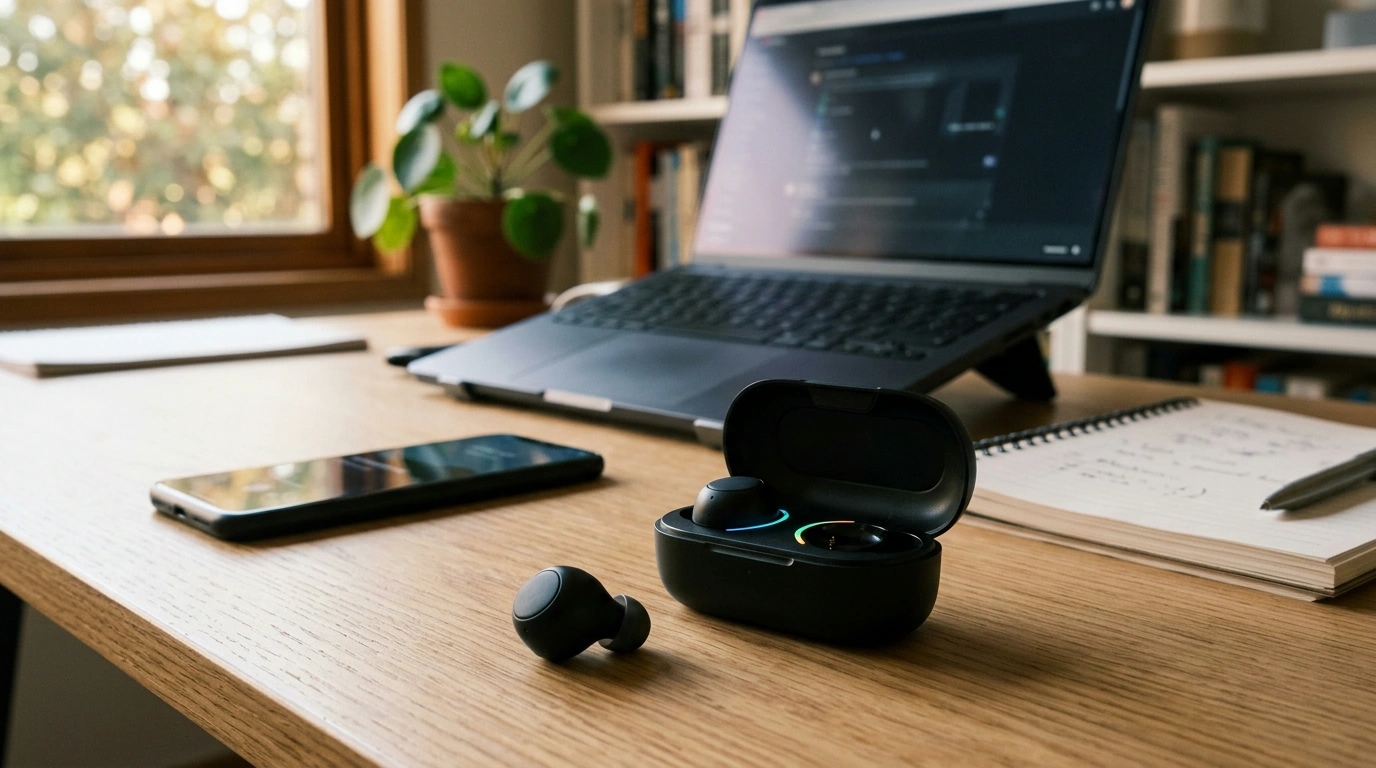
Wireless Bluetooth 5.4 Earbuds with RGB Light: Everyday Audio With a Little Extra Energy
Wireless earbuds should be easy to live with: quick pairing, stable sound, comfortable fit, and a case that’s ready when you are. Our Wireless Bluetooth 5.4 Earbuds with RGB Light add a fun visual touch without complicating the basics—so commuting, workouts, and desk days feel smoother from the first tap to the last track.
What makes these earbuds a smart daily pick
If you’re looking for an uncomplicated, grab-and-go audio setup, our team built this option around the stuff you actually do every day—switching devices, taking calls on the move, and squeezing in short listening sessions between tasks.
- Bluetooth 5.4 connection designed for modern phones, tablets, and laptops—aimed at steady pairing and reliable everyday use.
- RGB lighting adds personality for night walks, gym sessions, or simply finding your case faster in a bag.
- True wireless freedom keeps pockets clear and movement unrestricted—useful for calls, music, and short video sessions.
- Practical price point ($38.49) that works for gifting, upgrading from wired earbuds, or keeping a spare pair ready for travel.
Bluetooth 5.4 in real life: what it helps with
Bluetooth versions aren’t just numbers—they affect how smoothly your routine feels. While performance always depends on your phone/laptop and the environment, Bluetooth 5.4 is built for modern device behavior: lots of wireless traffic, frequent reconnects, and quick transitions between tasks.
- Cleaner handoff between devices in typical routines (phone to laptop, laptop to tablet), depending on device support and settings.
- Day-to-day stability in common spaces like offices, apartments, and transit where multiple wireless devices compete for space.
- Lower friction for quick sessions—take out, connect, play—especially when you use earbuds in short bursts.
- Tip: For outdoor use, keep the earbuds and phone on the same side of your body when you can, and keep your phone’s OS updated for the most consistent Bluetooth behavior.
Everyday pairing checklist
| Moment | What to do | Why it helps |
|---|---|---|
| First-time setup | Pair in a quiet spot, keep earbuds close to the phone | Reduces interference and speeds initial handshake |
| Switching devices | Disconnect on Device A before pairing Device B (or forget/re-pair if needed) | Prevents “stuck” connections |
| Video calls | Select the earbuds as both input and output in the app/system settings | Avoids microphone switching mid-call |
| Crowded areas | Keep the phone within a few feet and avoid blocking it with a metal water bottle or laptop | Helps maintain a stable signal |
RGB light: style that’s also practical
RGB lighting isn’t just a vibe—it can be useful when you’re dealing with dim rooms, early mornings, or a bag full of stuff.
- Better visibility in low light when pulling earbuds out on evening commutes, travel days, or in darker rooms.
- Easier to spot the case on a desk or inside a tote, so you spend less time hunting and more time moving.
- Plays well with your setup—gaming desks, colorful accessories, or a tech-forward look—without changing how the earbuds work.
- Quieter-setting tip: Store the earbuds in the case when not in use to keep things tidy and minimize attention-drawing glow.
Comfort, control, and calls: how to get the most out of them
Great everyday earbuds are the ones you don’t have to “fight.” A few small habits can make fit and call performance noticeably more consistent.
- Fit matters: If the earbuds feel loose, reseat them with a slight twist so the body rests securely; a stable seal improves both sound and call clarity.
- Long-session comfort: For extended listening, take short breaks. Comfort often improves when your ears get a moment to reset—especially during long workdays.
- Call tip: Take calls in calmer spots when possible. Background noise affects any compact microphone system.
- Keep controls simple: Treat play/pause, next/previous, and call answer/end as your core commands for smoother daily use.
- Sync check for laptop video: If audio and video drift, confirm your output device selection and disable extra audio enhancements that can add latency.
Charging and care that keeps earbuds dependable
Wireless earbuds stay “easy” when charging and hygiene are handled with light, consistent maintenance—no special gear required.
Quick product snapshot
- Product: Wireless Bluetooth 5.4 Earbuds with RGB Light
- Price: $38.49
- Availability: In stock
- Best for: commuting, workouts, casual listening, gifting, and adding a little color to everyday audio
Other in-stock picks you can add to your cart
- Calvin Klein Retro Square Sunglasses with Dark Lenses
- IPL Eye Beauty Device with Three-Color Light & Vibration
- Cozy Cartoon Cat Cave Bed for Kittens
Helpful references for smoother Bluetooth troubleshooting
- Bluetooth Core Specification (Bluetooth SIG)
- Apple Support: If you can’t connect a Bluetooth accessory
- Google Support: Fix Bluetooth problems on Android
FAQ
Will these Bluetooth 5.4 earbuds work with older phones or laptops?
Yes. Bluetooth is generally backward compatible, so these earbuds can connect to devices running older Bluetooth versions, though stability and features depend on your device’s Bluetooth hardware and software. If pairing is inconsistent, try removing the earbuds from your saved Bluetooth devices and pairing again.
How do the RGB lights behave during everyday use?
The RGB lighting is a visual feature designed to add style and visibility during normal use. For a cleaner look in quieter settings, store the earbuds in the case when you’re not listening and follow standard charging and storage habits.
What should be tried if only one earbud connects or plays audio?
Place both earbuds back in the case, close it briefly, then open it and try again. If that doesn’t fix it, forget the earbuds in your Bluetooth settings and re-pair, then confirm your phone or laptop is sending audio to the earbuds and that both sides are charged.
Recommended for you
Was this article helpful?
Yes
No








Leave a comment