360° Rotating 3-in-1 MagSafe Charging Station Guide

3-in-1 MagSafe Charging Station with 360° Rotation: A Cleaner Desk and Smarter Viewing Angle
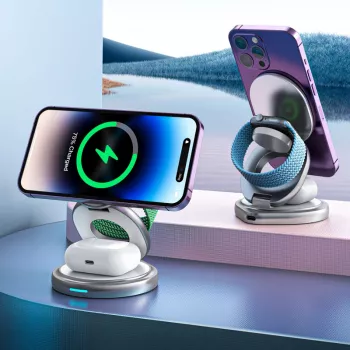
A rotating 3-in-1 charging station turns the everyday “where did I put my cable?” moment into a predictable routine: set your phone, watch, and earbuds down once, and wake up with everything powered. The bigger upgrade is visibility. With a 360° rotating phone mount, the screen can stay readable for StandBy mode, calls, alarms, and notifications—without dragging the whole charger base around or re-routing cords. Below is what rotation changes in daily use, how multi-device layouts fit common Apple gear, and what to check for safe, reliable charging. For more guidance, see How do you mount your phone? | Page 2.
What 360° Rotation Adds to a Charging Station
Most multi-device chargers solve clutter, but rotation solves the “I can’t see my screen from here” problem. A rotating phone mount lets the base stay planted while the display angle adapts to your space. For further reading, see Wireless Charging Rotating Car Mount Holder Charger.
- Better viewing without moving the base: Rotate the phone toward your pillow for StandBy mode, toward your chair for quick glance notifications, or toward the camera for video calls.
- More practical docked use: When the station stays in one spot, your cables stay managed in one spot. Rotation helps you point the phone where you need it without shifting the whole setup.
- Easier one-handed docking: Turning the magnetic pad toward you can make alignment feel more natural—especially when you’re placing the phone down in a hurry.
- More comfortable ergonomics: Small angle adjustments can reduce wrist, neck, and shoulder strain compared with a fixed, awkward orientation.
The 3-in-1 Setup: Phone, Watch, and Earbuds in One Spot
A 3-in-1 charging station is essentially a dedicated “drop zone” for the items most people carry daily. Instead of three separate cables (and three chances to forget something), everything charges from a single hub.
- Phone pad with MagSafe-style magnetic alignment: For compatible iPhones and magnetic cases, the phone snaps into a consistent position, which helps reduce the “charging but not really charging” issue caused by sloppy placement.
- Dedicated Apple Watch position: Keeping the watch on its own charger spot helps prevent it from sliding behind the nightstand and missing an overnight charge.
- Earbuds area for compact cases: The base area is typically designed around wireless earbud cases such as AirPods and similar Qi-compatible cases.
- Less cable clutter: One station makes the surface look calmer and keeps frequently used items easy to find.
How a 3-in-1 Charging Station Fits Common Setups
| Device | Typical placement | Best use case |
|---|---|---|
| iPhone (MagSafe-compatible) | Magnetic phone pad | StandBy clock, notifications, bedside charging |
| Apple Watch | Watch charger position | Overnight charging, morning-ready battery |
| Wireless earbuds | Base charging area | Daily top-ups, travel-ready convenience |
Compatibility Checks Before Buying
A clean setup only feels “effortless” when the devices actually align and charge reliably. A few quick checks can prevent most disappointments.
- Phone compatibility: MagSafe works best with iPhone 12 and later. Some older models can still charge wirelessly, but they won’t magnetically align the same way.
- Case compatibility: Thick cases, metal plates, and non-MagSafe designs can weaken the magnetic hold and reduce charging efficiency. A MagSafe-compatible case is the simplest path to consistent alignment.
- Watch compatibility: Confirm the station supports the Apple Watch magnetic charging method used by your watch generation.
- Earbuds compatibility: Your earbud case must support wireless charging; otherwise, the station’s base pad won’t be able to charge it.
For background details on MagSafe behavior and supported iPhone models, Apple’s reference is a helpful starting point: Apple Support — About MagSafe on iPhone.
Charging Performance and Power Requirements
Charging three devices at once is less about “maximum wattage” and more about stable power delivery and consistent alignment.
For general wireless charging standards and compatibility, the Qi overview from the Wireless Power Consortium is a reputable resource: Wireless Power Consortium — Qi Standard.
Heat, Safety, and Everyday Reliability
Where a Rotating Station Fits Best: Desk, Nightstand, and Travel
Product Spotlight: 3-in-1 MagSafe Charging Station with 360° Rotation
If the goal is one dependable hub for daily carry essentials, the 3-in-1 MagSafe Charging Station with 360° Rotation is built for exactly that rhythm. The rotating phone mount helps keep the screen usable while docked, and the 3-in-1 layout encourages a consistent “set it down and you’re done” routine—at night and during the workday.
Quick Details
| Item | Details |
|---|---|
| Name | 3-in-1 MagSafe Charging Station with 360° Rotation |
| Price | 54.80 USD |
| Stock | In stock |
| Product page | View product |
More In-Stock Picks to Round Out a Daily Carry Setup
- Calvin Klein Retro Square Sunglasses with Dark Lenses (great for keeping an “out-the-door” essential near the same drop zone as your charger)
- IPL Eye Beauty Device with Three-Color Light & Vibration (a compact add-on for a nightstand routine alongside nightly charging)
FAQ
Will it charge through a phone case?
It typically works best with MagSafe-compatible cases. Very thick cases or cases with metal plates can weaken magnetic alignment and reduce charging performance.
Can all three devices charge at the same time?
Yes, typical 3-in-1 designs can charge a phone, watch, and earbuds simultaneously. For best results, use a sufficiently powerful wall adapter and make sure each device is properly aligned on its charging area.
Why does the phone get warm while charging wirelessly?
Mild warmth is normal during wireless charging. Excessive heat can come from misalignment, thick cases, charging while running heavy apps, or an adapter/cable that doesn’t meet power needs.










Leave a comment